Showing posts with label Photos. Show all posts

2014-2015 Photos Finally Uploaded!

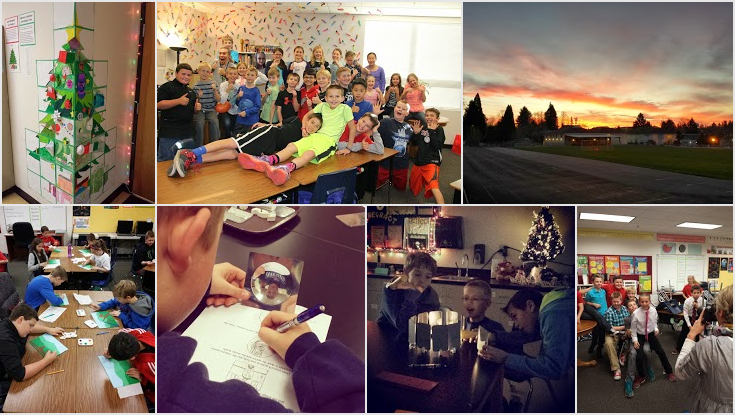
I have finally uploaded all of the photos I have taken (as well as a few parents' photos). I'm sorry it has taken me so long! I believe it is the past 4 months of photos added to the album. Feel free to download them all at once, or pick and choose individual ones you like. Let me know if you have any questions or trouble viewing them.

>> Riedlteach.com: Classroom Photos & Videos

Enjoy!
--Mr. Riedl


2015-06-11

Can I Use That Picture? - Image Copyright Flowchart

Knowing the copyright laws for using images can be a bit tricky, especially in education. My desire is for teachers and students to be as fair and honest about where they are getting their images (and other information) online. If you find on my website that I am not following fair use and copyright laws, please let me know as soon as possible so I can fix my mistake.

Follow these series of questions in the following flowchart to know if you can use a picture for your purposes or not. Source: TheVisualCommunicationGuy


Print Friendly and PDF

Updates to Riedlteach.com

I have updated a few pages on or relating to my website that will hopefully be helpful to you.

The Classroom Photos & Videos page has been updated with easy-to-access links to my Mr. Riedl Google+ page (photos) and my YouTube channel (videos).

I added a new album to the classroom photos collection: Cave Canum Mosaic Art 2014-04-17. Be sure to check it out and browse the beauty of variety in our students' art projects!

On the front page of Riedlteach.com, I have added several small buttons below the main 6 sections of my website. Those buttons are quick links to commonly accessed pages:


Lastly, I updated the Forms & Resources page awhile ago. It only has a few items right now. I am wanting to put more forms online for families to access at home, but I would love feedback to know which ones would be most useful. Please let me know by replying or leaving a comment. Thanks!

Hoop Day was Auto Awesome on Google+

I have been having fun with my Google+ photos recently, especially with the "Auto Awesome" images that are automatically created after uploading photos that fulfill certain specific requirements. In the posts embedded below, the "Motion" Auto Awesome photos created animated gifs from a series of photos I took during Hoop Day. Enjoy! (Note: If you have a relatively slow internet connection, it might take a few minutes for the images to load)

One Luke is shooting while the other Luke is dancing to the music!


Josh shooting on Hoop Day!


Jackson shooting on Hoop Day!

New Photo Albums on Google+

For your viewing pleasure, I currently store all classroom photos in two locations: Google+ and Facebook. My preference is Google+ for a variety of reasons, but the main one is that you are able to download an entire album of photos at once (as far as I know, Facebook only allows you to download one photo at a time). So, all of the student work albums listed below will send you to the albums on Google+. Random photos from the school year are located in both locations.

Google+ Photos is relatively new to me, as I have used PicasaWeb up until this point in time. A couple of the albums below have been transferred to G+ from PicasaWeb, so some of you may have already seen them. I absolutely love Google+ Photos and the options available on the mobile app, allowing me to take pictures and easily upload them to G+ and/or Google Drive without even having to sit in front of the computer!

And of course, Google+ creates Auto Awesome photos for fun!

Enjoy the classroom photos below (Random photos of the 2013-2014 school year so far are at the bottom!).
--Mr. Riedl


2013-2014 Photos (I regularly add to this album)

Hand Drawings

We enjoyed finishing up our first art project a couple of weeks ago! They are now hanging on the Student Showcase in the classroom. Embedded slideshow is below. Enjoy!

Not loading? Click here

End-of-the-Year Slideshow

Embedded below is the end-of-the-year slideshow that I showed my students on the last day of school. I edited a few things since they watched it, including added background music, no repeated pics, and a nice memorable video clip at the end.

Enjoy! I'll miss you all!
--Mr. Riedl

http://youtu.be/jt8lhaqzzcU

Lots of photos!

Here are a bunch of photos from the last few weeks that I finally found time to post on the website.
Enjoy!
--Mr. Riedl
instagram.com/mrriedl


Friday Reading Buddies

We have had so much fun reading with our buddies this year! We love the 1st graders in Mrs. Brown's class! Below is a photo slideshow of yesterday's afternoon with them.


https://picasaweb.google.com/102454439242306386310/ReadingBuddies20130517

Mr. Riedl is now on Instagram!

I have absolutely fallen in love with Instagram! It is such a wonderful collection of photographic artwork. Now, in a fun, new way, I can simply utilize this resource with the photos I have already been taking of the classroom, students, and our school community!

Photos are a great way to capture memories and are even easier now that we have smartphones and other mobile devices. Although I am too young to remember the Kodak Instamatic, I do remember using Polaroids and often used the catchphrase "Kodak moment." Maybe we will soon be saying "Insta-moment"?

Many of my students have told me they are already on Instagram, so be sure to connect with me!
UPDATE: I just discovered the Instagram Terms of Use states that one must be at least 13 years old to use the service. Please understand that I do not condone breaking the law.

My user name is mrriedl. Check out my first two photos below!


Writing Process Using Google Drive

Ever since I first introduced Google Drive into my writing curriculum, I have been tinkering here and there with the process of how I was going to go back and forth between the computer lab, our classroom, and working online at home. Below is a whiteboard drawing I created today, hopefully to help those students (and parents) who need a visual showing the entire writing process using Google Drive.

This process is definitely a work in progress, but so far it has been a good mix of screen time and pencil time. The students should know the process below fairly well. We have been excited to utilize this amazing resource that Google has created, and many of the students are beginning to appreciate the advantages of cloud computing.


Print Friendly and PDF